CMMS software: A CMMS your contractors actually work in.
GeoWorks is a computerised maintenance management system for organisations with many sites. Work orders, planned preventive maintenance, the asset register and an offline mobile app, with the helpdesk, contractors and costs connected to every job.
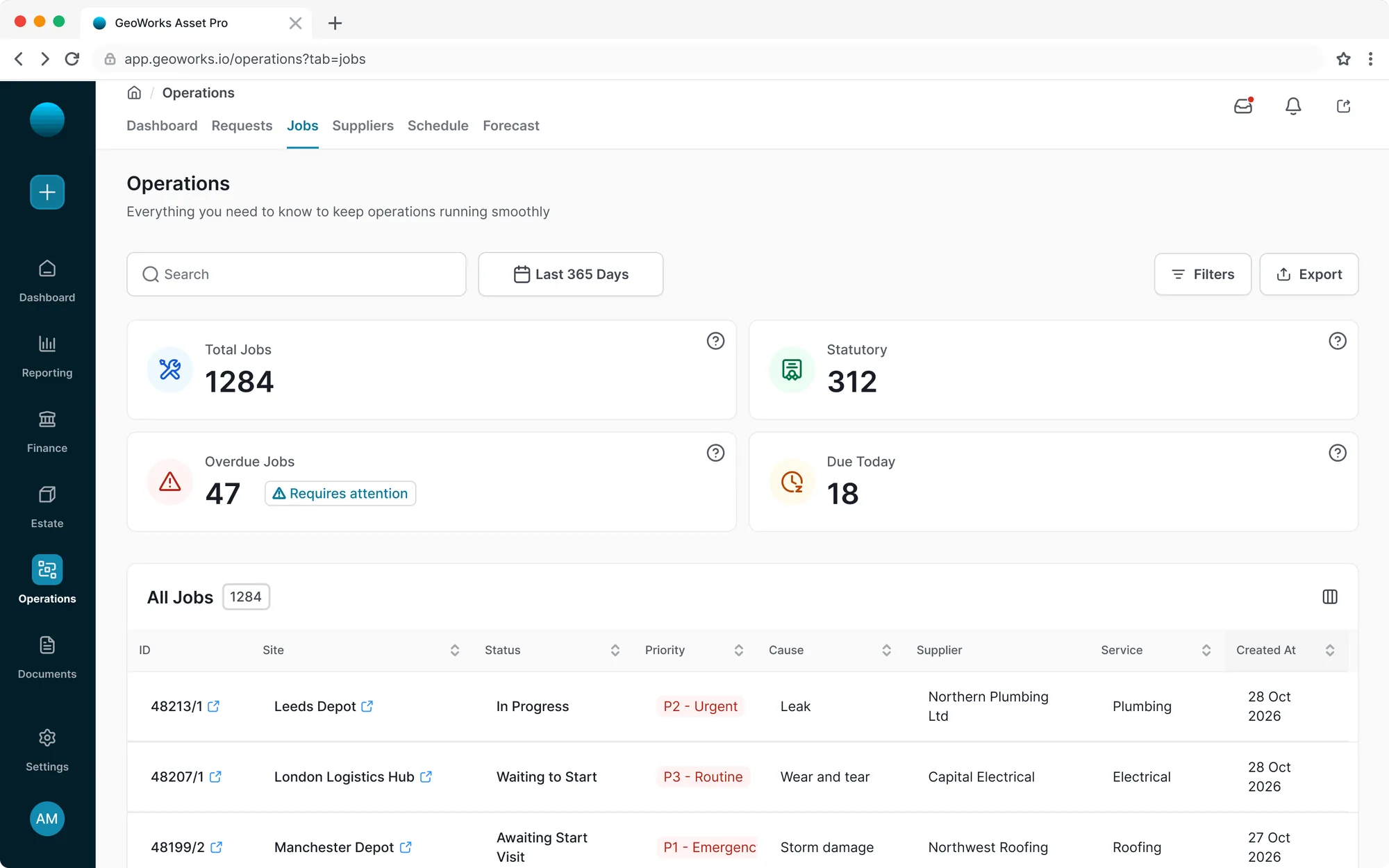
Every asset maintained. Every job on record.
A CMMS earns its keep when nothing about maintenance lives outside it: not the PPM spreadsheet, not the contractor’s email, not the operative’s paper sheet.
- Work orders
Work order management
Reactive and planned jobs with priorities, SLA clocks, visits and a full timeline.
- PPM
Planned preventive maintenance
Schedules against sites, locations or assets that release and assign themselves.
- Assets
Asset register & history
Estate, site, location, installation and asset, each with its maintenance history, documents and condition.
- Mobile
Offline mobile app
Risk assessments, photos, tests and sign-off on iOS and Android, with or without signal.
- Reporting
Maintenance KPIs
SLA, compliance, first-time fix, utilisation and spend, live and filterable.
- Costs
Maintenance cost control
ONTE limits per job type, quotes and audited applications for payment.
From fault to fixed, without the chasing.
The same pipeline handles a broken ticket gate, a quarterly fire inspection and a lamp out on a residential street.
- Raise
Request or schedule
A fault arrives through the helpdesk, or a PPM schedule releases on time.
- Assign
Right supplier
The preferred supplier for that site and service gets the job, with priority and SLA.
- Plan
Visit booked
The supplier schedules an operative on the visual planner.
- Attend
Evidence captured
Risk assessment, photos, tests and sign-off in the offline app.
- Close
Costed and audited
The job closes with its cost attached and goes into the next application for payment.
You don’t have to choose.
In the UK the two terms are often used for the same thing. The difference is scope: a CMMS maintains assets, a CAFM system runs the facilities operation around them. GeoWorks covers both.
| Capability | Typical CMMS | Typical CAFM | GeoWorks |
|---|---|---|---|
| Work orders and job history | Yes | Yes | Yes, reactive and planned in one pipeline |
| Planned preventive maintenance | Yes | Yes | Yes, schedules release and assign themselves |
| Asset register | Yes | Yes | Yes, estate to asset, with history and documents |
| Helpdesk and fault reporting | Sometimes | Yes | Yes, including a branded public form |
| Contractors working in the system | Rarely | Varies | Yes, from job acceptance to payment |
| Statutory compliance reporting | Varies | Yes | Yes, live by category with remedials |
| Budgets and applications for payment | Rarely | Varies | Yes, ONTE limits and audited applications |
Want the long version? Read CAFM vs CMMS: what’s the difference? or see how GeoWorks works as CAFM software.
Maintenance is a team sport. Your CMMS should be too.
Built for many sites
An estate, site, location and asset hierarchy that holds a train operator’s stations or a whole street lighting network.
Contractors included
Suppliers see their jobs, plan visits and apply for payment, so status is never a phone call away.
Compliance you can prove
Every inspection, certificate and remedial is linked to the asset and the job, ready for audit.
For estates teams and the contractors who serve them.
GeoWorks is used by organisations that own the estate and by the service providers who maintain it.
In-house estates and maintenance teams
Rail operators, hospitality groups and local authorities running reactive and planned work across many sites. See industries.
FM and maintenance contractors
Service providers running clients’ estates, with branded fault reporting and SLA reporting per contract. See CAFM for FM providers.
Compliance and asset managers
Statutory categories, inspection results and asset condition in one place, exportable for audit.
See GeoWorks on your estate.
Tell us about your sites, assets and contractors. We’ll show you GeoWorks configured the way you work, and the pipeline we’d build with you during onboarding.
Prefer email? sales@geoworks.io
Thanks. Request received.
We’ll reply to you within one working day to find a time for your demo.
- We get in touchFrom sales@geoworks.io, to arrange a time that suits you.
- A 30-minute demoGeoWorks set up around your sites, assets and contractors.
- Your onboarding planThe pipeline we’d build with you, if GeoWorks is a fit.